





Key Takeaways
- AI crawlers serve three main purposes: training, indexing, and live retrieval.
- AI crawling activity now exceeds that of traditional search engine crawlers (Cloudflare Radar, 2024).
- Many AI crawlers ignore robots.txt — auditing access is essential.
- High crawler activity can skew web traffic metrics and strain server resources.
- You can allow, block, or selectively permit different crawler bots.
- Blocking AI crawlers entirely may reduce visibility in AI search results.
Introduction
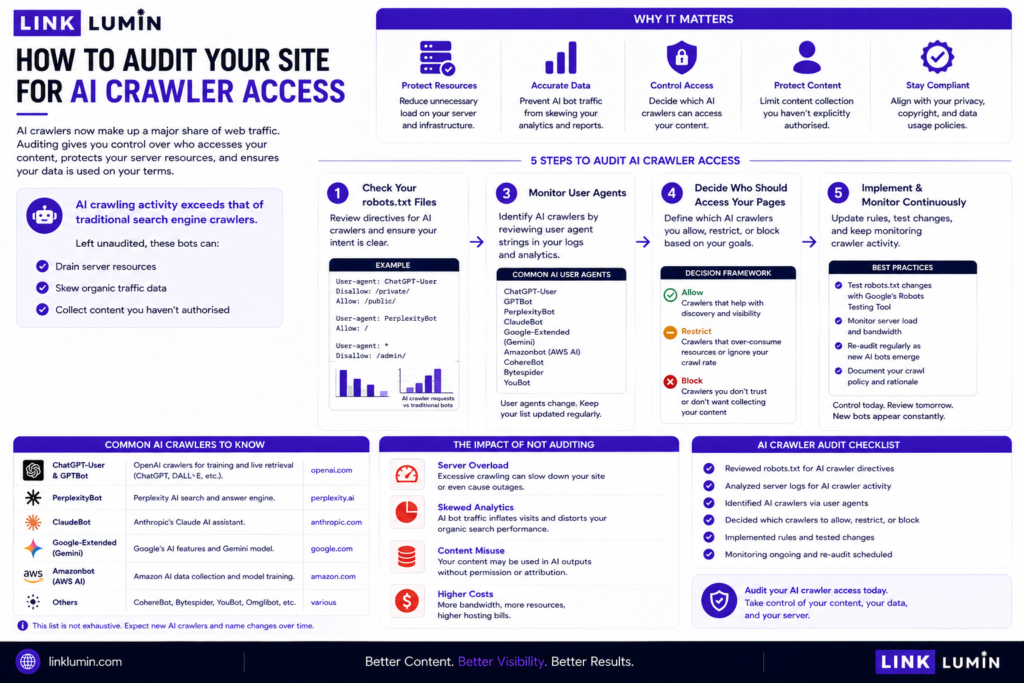
To audit your site for AI crawler access, check your robots.txt files, review server logs, monitor user agents, and decide which crawler bots should access your web pages. AI crawlers — the bots that gather content to train large language models (LLMs) and power AI features like live retrieval and AI overviews — now form a major share of web traffic. AI crawling activity exceeds that of traditional search engine crawlers. Left unaudited, these bots can drain server resources, skew organic traffic data, and collect content you haven’t authorised.
Who This Guide Is For
This is for website owners, SEO professionals, and developers who want to control what AI systems access on their site — whether the concern is training data, AI search indexing, or live retrieval.
What Are AI Crawlers?
AI crawlers are automated tools that traverse the internet to collect data for AI systems. They differ from traditional search crawlers in purpose and technique.
AI crawlers serve three main purposes:
- Training bots — collect vast amounts of data for training models and large language models (LLMs). One example is the class of AI training bots that gather content across the internet.
- Indexing bots — create searchable databases for AI search engines and AI platforms. These are the next generation of search crawlers.
- Retrieval bots — provide real-time relevant information for user prompts via live retrieval. AI chatbots use these to surface websites on demand.
AI crawlers focus on semantic understanding, using other tools and techniques beyond keyword matching. Traditional search crawlers primarily index pages based on keywords and links. AI crawlers convert unstructured data into structured formats users and AI systems can act on.
Why AI Crawler Access Matters
AI crawlers can generate massive traffic spikes, trigger bandwidth overages, slow page loads, and cause session timeouts.
AI crawler activity reduces direct human traffic. It skews metrics like page views and bounce rates. If you are not monitoring crawler activity, your analytics may be misleading you.
There is also a content control issue. AI crawlers collect data for training large language models. Once collected, your web content may become training data used to build AI models.
Step 1: Check Your robots.txt File
Your robots.txt file is the first line of control. It tells crawler bots which pages to access and which to avoid.
Check it by visiting yoursite.com/robots.txt in your browser. Look for:
- User-agent rules for all crawlers (User-agent: *)
- Specific rules for known AI web crawler bots
- Blocked pages or directories — and whether those blocks are current
The critical caveat: AI crawlers often ignore robots.txt directives. A robots.txt entry is an instruction, not an enforcement mechanism.
Step 2: Identify AI Crawlers in Your Server Logs
Server logs record every request made to your site, including the user agents of each web crawler bot. This is where you see what is actually happening — not what robots.txt hopes will happen.
How to audit:
- Access your server logs via your hosting control panel or FTP.
- Filter by user agent strings — look for AI search crawler agents including GPTBot, ChatGPT-User, PerplexityBot, and other AI retrieval crawlers alongside other bots you don’t recognise.
- Separate legitimate bots from malicious bots — some traffic may not be AI crawlers at all.
- Note IP addresses making repeated, high-volume requests.
- Compare crawler traffic against organic traffic to gauge AI crawler activity proportion.
AI crawlers can access any public content on the web. If a page is public, assume it has been — or will be — crawled. Users may be surprised by how much of their site is exposed.
Step 3: Audit Your Site Structure for Crawler Exposure
Your site structure determines how much content crawlers can reach.
Crawlers miss content buried in JavaScript or poorly linked pages. But relevant pages you don’t want crawled may be exposed if linked from public URLs.
Check:
- Are sensitive pages linked from public-facing pages?
- Is your entire site crawlable by default?
- Are landing pages or thin pages accessible to crawler bots?
- Are canonical URLs correct to avoid duplicate data collected?
Step 4: Decide Your Crawler Access Policy
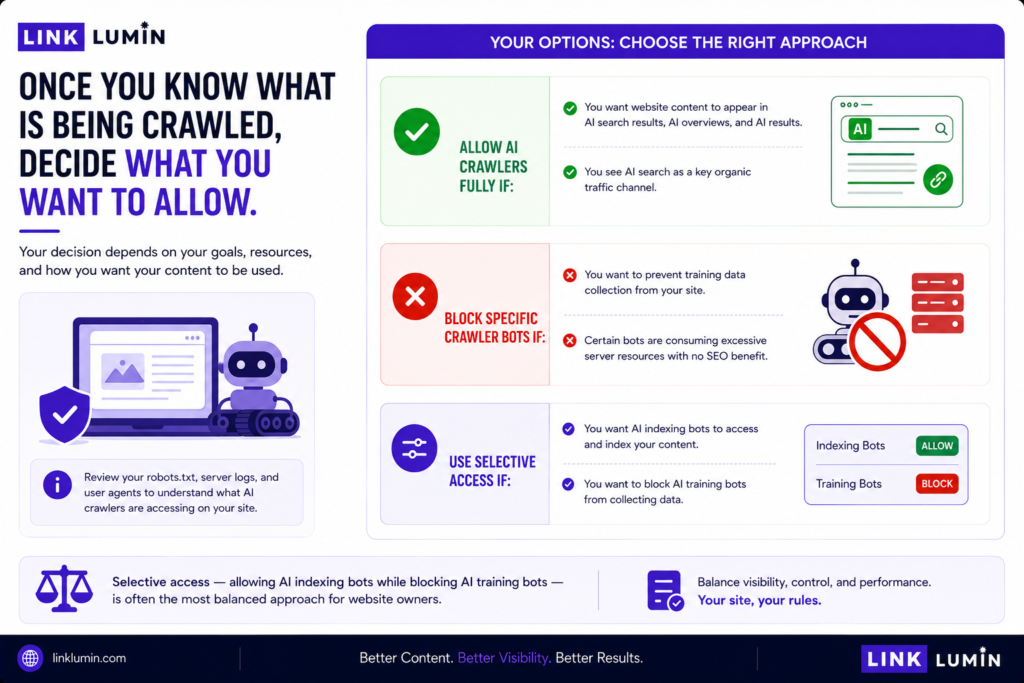
Once you know what is being crawled, decide what you want to allow.
Allow AI crawlers fully if:
- You want website content to appear in AI search results, AI overviews, and AI results.
- You see AI search as a key organic traffic channel.
Block specific crawler bots if:
- You want to prevent training data collection from your site.
- Certain bots are consuming excessive server resources with no SEO benefit.
Selective access — allowing AI indexing bots while blocking AI training bots — is often the most balanced approach for website owners.
Step 5: Implement and Test Your Crawler Control
Once you have a policy, implement it.
In robots.txt:
The most important AI crawler user-agent strings to know:
| Bot name | Operator | Purpose | Disallow directive |
|---|---|---|---|
| GPTBot | OpenAI | Training data | User-agent: GPTBot |
| OAI-SearchBot | OpenAI | Live retrieval | User-agent: OAI-SearchBot |
| ChatGPT-User | OpenAI | Browsing plugin | User-agent: ChatGPT-User |
| ClaudeBot | Anthropic | Training data | User-agent: ClaudeBot |
| PerplexityBot | Perplexity | Indexing | User-agent: PerplexityBot |
| Google-Extended | Gemini training | User-agent: Google-Extended | |
| CCBot | Common Crawl | Training datasets | User-agent: CCBot |
| Bytespider | ByteDance | Training data | User-agent: Bytespider |
| Applebot-Extended | Apple | AI features | User-agent: Applebot-Extended |
To block a specific bot, add its directive followed by Disallow: /. Use specific user agents — blanket blocks with User-agent: * will also block legitimate search engine crawlers.
HTTP headers — adding an HTTP header (X-Robots-Tag: noai) signals AI companies that wish to honour it. Not all do.
IP blocking — identify IP addresses of known AI crawlers in server logs and block them at the firewall level. This is more effective than robots.txt alone.
Test using Google Search Console’s robots.txt tester. Ensure standard search engine bots are still allowed through.
Step 6: Monitor Crawler Activity Ongoing
Auditing is not a one-time task. New AI bots emerge regularly.
Set up:
- Server log monitoring — review AI bot traffic monthly.
- Web traffic alerts — flag unusual spikes indicating crawler activity.
- robots.txt reviews — update your text file as new AI user agents are identified.
- Crawl budget tracking — ensure AI crawler activity isn’t consuming crawl budget needed by legitimate search engine bots.
AI crawlers are more resource-intensive than traditional crawlers. Continuous monitoring protects both site performance and your data.
The Strategic Trade-Off
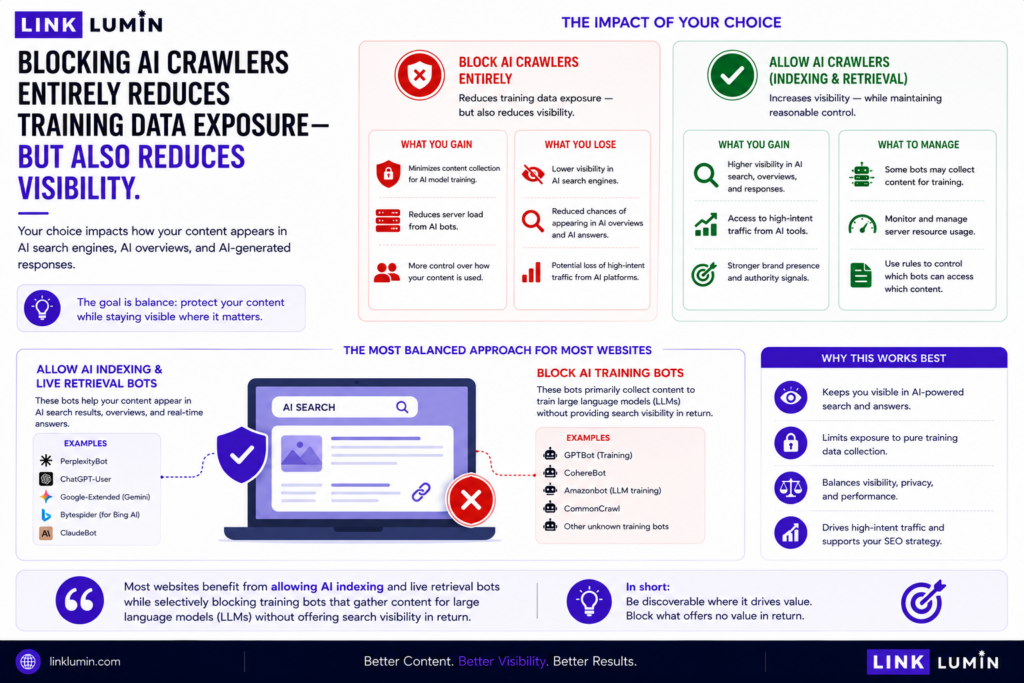
Blocking AI crawlers entirely reduces training data exposure — but also reduces visibility in AI search engines, AI overviews, and AI-generated responses.
Most websites benefit from allowing AI indexing and live retrieval bots while selectively blocking training bots that gather content for large language models (LLMs) without offering search visibility in return.
Once you know which AI crawlers are visiting your site, the next step is measuring what traffic they are actually sending.
FAQs
1. What are AI crawlers and how do they work?
AI crawlers and AI bots collect web content for AI models — training large language models, building AI search engine indexes, and powering live retrieval for AI chatbots. Unlike traditional search engine crawlers that index pages for keyword-based search, AI crawlers focus on semantic understanding. AI crawling activity now exceeds traditional search crawler traffic on many sites (Cloudflare Radar, 2024).
2. Do AI crawlers and AI search engines ignore robots.txt files?
Many do. AI crawlers often ignore robots.txt directives, meaning your disallow instructions may not be honoured by all AI bots and AI search engines. Robots.txt remains a useful signal — and some AI platforms do respect it — but it is not an enforcement mechanism. For more reliable control, combine robots.txt rules with IP blocking and HTTP header signals targeting AI search crawler activity.
3. How do I check my site’s AI crawler activity?
Check your server logs via your hosting control panel and filter by user agents associated with AI bots. Look for high-volume, automated requests from unfamiliar crawler bots alongside legitimate bots. Compare crawler traffic against organic traffic to understand the proportion of AI crawler activity. Unusual traffic spikes with low engagement are a common sign of crawler bots rather than human visitors accessing your web pages.
4. Should I block AI crawlers to protect my website content?
It depends on your goals. Blocking AI bots prevents your content from being used as training data and protects server resources. But blocking AI crawlers may reduce your visibility in AI overviews, which use live retrieval to surface content in AI search. Most website owners benefit from a selective approach: allowing AI search indexing and live retrieval while blocking training-focused crawler bots.
5. How does AI crawler activity affect my organic traffic metrics?
AI crawlers can skew web traffic metrics like page views and bounce rates because bot visits are recorded alongside human visits in many analytics setups. High AI crawler activity can inflate session counts and distort engagement data. Filter known AI bot user agents in your analytics tool to separate crawler traffic from genuine organic traffic. Server logs provide the most accurate view of actual AI crawler activity.