





llms.txt is a plain text file placed at your website root that tells AI search engines how to read and represent your brand. For Ontario businesses, it takes under an hour to deploy and costs nothing. The evidence from multiple independent SEO practitioners is mixed — there are documented cases where brand mention accuracy in AI-generated answers improved, and documented cases where it had no measurable effect.
For Ontario business owners and marketers deciding whether llms.txt belongs in their AI search strategy.
Key Takeaways
llms.txt is a plain text file placed at your website root — no developer, no plugin, no code snippets required to create one.
At least 3 major AI platforms actively read llms.txt files during live retrieval as of mid-2026, though adoption and support vary among providers.
AI visibility now includes brand mentions and citations in AI answers — not just traditional search rankings. Brands lacking AI search visibility risk becoming invisible to users as AI overviews and AI-generated answers replace click-through results.
llms.txt does not replace structured data, robots.txt, or traditional SEO. It is one layer in a broader AI search strategy, not a standalone fix.
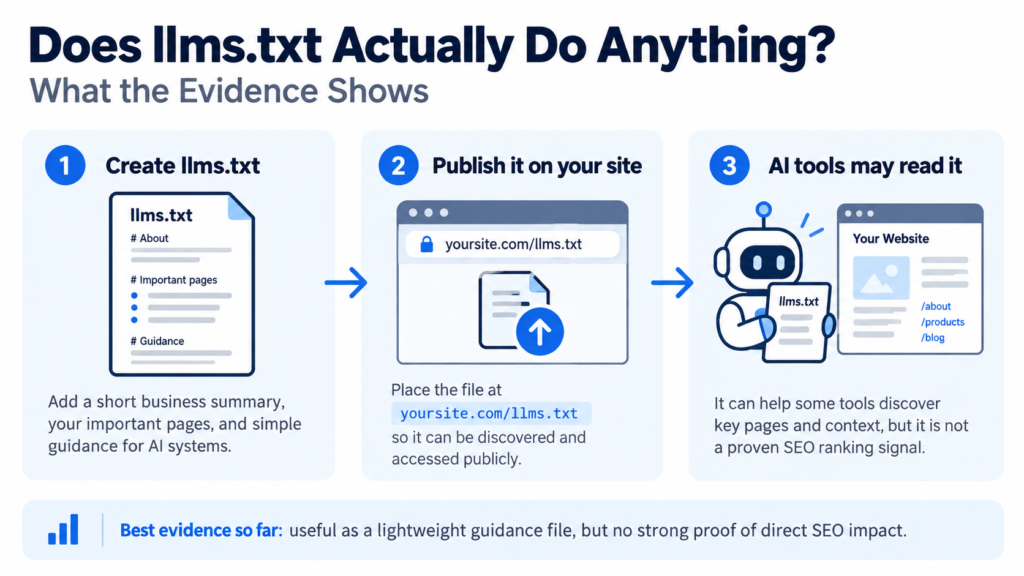
Does llms.txt Actually Do Anything? What the Evidence Shows, Defined
llms.txt is a proposed open standard — a plain text, markdown-formatted guidance file placed at yoursite.com/llms.txt. It acts as a curated roadmap for artificial intelligence systems, explicitly guiding AI assistants to canonical pages and helping them understand what your website is about, who it serves, and how its content should be used.
Unlike robots.txt, which enforces crawl rules, llms.txt is advisory — AI crawlers are not required to read it.
Independent practitioner tests (Zyppy, 2024) indicate that when AI crawlers read llms.txt, brand representation in AI answers can improve — but Google has not confirmed any effect and results vary by platform. The file costs nothing to implement and creates no known downside.
How It Works
llms.txt works by bypassing the heavy HTML and digital clutter that AI tools must normally parse when crawling a site. When an AI platform performs live retrieval — pulling real-time data from the web to generate AI answers — it processes your pages.
If it finds an llms.txt file, it can read that first. A well-written file reduces computational costs for AI by supplying clean text and focuses the crawler on clarity and inference rather than layout noise. This is why it matters for AI-search optimization alongside traditional SEO.
Step by Step
How the file is read, parsed, and integrated — from discovery to response generation.
Stage One: Discovery and Retrieval
An AI search engine or AI agent visits your domain. It checks the root directory for known guidance files — robots.txt, sitemap.xml, and, increasingly, llms.txt. The txt file is retrieved using a standard HTTP request, identical to how any page is accessed. Plain text files stored at the root are universally readable across all operating systems — Windows, Linux, macOS — and require no special encoding. The .TXT file format was developed between the 1960s and 1970s and remains backwards compatible with every modern system. Modern implementations use UTF-8 encoding rather than the older ASCII standard, which supported only 128 characters.
Stage Two: Parsing and Key Features Extraction
The AI engine reads the plain text content and parses the markdown syntax inside — headings, links, and any formatting instructions included. TXT files contain only electronic text without rich formatting, which is exactly what AI systems prefer: no code snippets to strip, no HTML wrappers to discard.
llms.txt uses Markdown instead of XML or raw code, making it human-readable as well as machine-readable. Keep the file under 500 words — larger files increase processing overhead without adding signal value. The text file creator controls exactly what context the AI receives.
Stage Three: Integration Into the Response
The parsed content enters the AI model’s context window alongside other retrieved page data. When a user submits a query relevant to your business, the model has your llms.txt context available.
llms.txt helps improve accuracy and citations for AI models by providing a distilled map of your site rather than requiring the model to infer your structure from raw pages. It does not guarantee a brand mention or citation, but it reduces the chance of the AI misrepresenting your services, geography, or offer in AI-generated answers.
The Main Types
Not all llms.txt implementations serve the same purpose. There are two primary use cases, and choosing the wrong one reduces the file’s effectiveness.
Type Comparison Table
| Brand-context file | Structured resource index | |
|---|---|---|
| Primary function | Guide how AI describes your brand | Help AI navigate large site architecture |
| File format | Short plain text, markdown syntax | Longer index with categorized URLs |
| Best for | Service businesses, local brands | Publishers, SaaS platforms, agencies |
| Effect on AI answers | Improves brand representation accuracy | Improves page-level citation relevance |
| Typical file size | Under 300 words | 300–500 words |
| Implementation time | Under 30 minutes | 1–2 hours |
Type One: Brand-Context File
A brand-context llms.txt includes a plain text summary of your business, links to your most important service pages, and clear instructions about your offer, location, and audience.
llms.txt explicitly guides AI assistants to canonical pages. When a user asks an AI search engine about services in your area and your business appears inaccurately — wrong location, outdated offer, missing qualifications — a brand-context file is the fastest fix.
Best Suited To
Service businesses in competitive local markets: law firms, accountants, healthcare providers, and professional services in Ontario where AI search visibility errors cause direct commercial harm.
Also suited to any business with identified visibility gaps — where AI-generated answers describe their brand incorrectly or omit them entirely.
Limitation to Know
A brand-context file does not prevent AI crawlers from reading other pages on your site. Outdated or contradictory content elsewhere on your domain will undermine the guidance the file provides.
Type Two: Structured Resource Index
A resource-index llms.txt lists key pages with descriptive link text, organized by topic with brief notes on what each covers. It gives AI platforms more tools to navigate your content accurately. This format suits content-heavy sites — publishers, SaaS platforms, agencies — where the crawler needs help across many content types. The goal is page-level citation accuracy: ensuring AI links to the correct page, not a less authoritative one.
What It Is Not
Three things llms.txt is regularly confused with:
What llms.txt Cannot Control
It is not robots.txt. robots.txt is an enforced access-control mechanism that major crawlers honour. llms.txt is advisory — an AI crawler that wants your data will collect it regardless of what your llms.txt says. The two files serve different functions and should both be present on your site. Confusing them leads to misplaced expectations about what llms.txt can control.
It is not a Google search ranking factor. Google has not confirmed any use of llms.txt in its standard crawlers, AI Overviews, or AI mode as of mid-2026. It does not move your position in traditional search engine results pages.
Treating it as a traditional SEO signal produces misleading results in any competitive analysis. For Link Lumin’s original question-and-answer breakdown on this file format, see Does llms txt actually do anything.
It is not a substitute for quality website content. llms.txt can improve how AI systems read what you have — it cannot manufacture authority or accuracy your site does not already possess.
AI search engines like ChatGPT and Gemini influence brand authority by drawing on broader signals your entire domain sends. If your website content is thin or outdated, llms.txt points AI crawlers to the problem rather than masking it. It is extremely helpful when it accompanies strong, accurate content — and adds almost no value when it does not.
Who It Suits in Ontario
Ontario businesses in competitive local markets stand to gain the most from implementing llms.txt correctly. As AI overviews and AI-generated answers become primary discovery channels — particularly for professional services in Brampton, Mississauga, Toronto, and the broader GTA — the accuracy of how your brand appears in AI answers matters.
Tracking AI visibility helps identify competitive gaps in brand mentions. A brand’s AI visibility now includes not just whether it appears, but how it is described — the service area named, the specialization stated, the credentials cited.
Why AI Visibility Now Matters Competitively
Businesses running competitive analysis are finding that competitors with well-structured llms.txt files are cited more accurately in AI mode responses.
For businesses investing in AI-search optimization, llms.txt is a low-effort addition that complements structured data, E-E-A-T signals, and content quality.
When a Brampton prospect asks an AI platform for a recommendation and your business is described incorrectly, a well-maintained llms.txt file reduces that error.
The file does not manufacture visibility — it guides AI toward visibility you have already earned. It provides actionable insights into where your brand’s presence in AI answers diverges from reality — and gives you a direct channel to correct that. Businesses that have their on-page content, local signals, and technical SEO in order see the clearest improvement in brand mention accuracy after deploying a well-written llms.txt file.
Frequently Asked Questions
Does llms.txt affect Google search, AI Overviews, AI mode, or AI search engines?
Google has not confirmed support for llms.txt in its crawlers, AI Overviews, or AI mode as of mid-2026. Standard crawl control runs through robots.txt.
Other AI search engines are beginning to read llms.txt actively. Google search remains unaffected.
What is the llms.txt file format and what are its key features?
A standard txt file is a plain text document used for any purpose — notes, raw data storage, configuration files, logs.
llms.txt is a specifically named and structured text file placed at your website root, formatted in Markdown and designed exclusively to guide AI search engines and large language models toward canonical pages. The file format is identical — plain text — but the naming, location, and structured markdown content are what make it a guidance signal rather than a generic document.
How do I track brand mention and AI search visibility in AI mode after implementing llms.txt?
There is currently no direct equivalent to Google Search Console for llms.txt. Search for your business name in AI platforms regularly and note how they describe you.
Monitor server logs for requests to yoursite.com/llms.txt from known AI crawler user agents. More tools are emerging — brand mention and AI mode tracking platforms are now part of many SEO toolsets.
How do I create an llms.txt file using a text editor on Microsoft Windows — without more tools or plugins?
On Microsoft Windows, open Notepad — the default text editor. On a Mac, use TextEdit set to plain text mode. Neither Microsoft Word nor any specialist text file creator is needed.
Write a short description of your business, list your key pages in Markdown format, and save as llms.txt. Upload via your CMS or FTP. Test by opening yoursite.com/llms.txt in your browser. Under 30 minutes total.
About Link Lumin
Link Lumin is an Ontario-based SEO and digital marketing agency specializing in AI search visibility and content strategy. We help businesses stay accurately represented as AI-generated answers replace traditional search results. Contact us at (647) 699-2555.
View everything we offer at Link Lumin services.
Service Area
Link Lumin serves Brampton, Mississauga, Toronto, North York, Etobicoke, Oakville, Burlington, Hamilton, Markham, Richmond Hill, and Vaughan, with AI search and SEO strategies built around your actual service geography.
Next Step
Contact Link Lumin for a free consultation on AI-search optimization — and find out whether llms.txt belongs in your strategy.